Adobe Flash Player is a free plugin that allows you to play videos, animations, games and other media on the Internet. Until a few years ago, it was the standard reference on the web, but Flash Player is gradually being replaced by the lighter and more efficient HTML5.
It is actually a resource-hungry plugin that can hinder navigation for slower connections and less powerful computers. For this reason, browsers like Google Chrome
You might also be interested in… always ask for user permission before running it.
- Install Ubuntu on PC, USB, and hard drive
- Remove Windows login password
- How to activate Windows 10
Despite this, this standard is still one of the most used on the web today, and many users wonder daily how to install it and keep it updated. In this guide, you will find all the information you were looking for, with practical step-by-step instructions.
Let’s talk about…
- 1 What is it? All the details
- 1.1 What is it used for?
- 2 Download: Here’s how to run it
- 2.1 Windows 10, 8, and 7
- 2.2 Mac OS X
- 2.3 Android
- 2.4 Chrome (extension)
- 2.5 Firefox (plugin)
- 3 Help with Flash Player Installation
- 4 How to activate the extension
- 4.1 Plugin locked? Here’s how to fix it
- 5 Update: How do you do it?
What is it? All the details
Adobe Flash Player is a free plugin, usually installed on web browsers. It allows you to display multimedia files, launch applications that do not require a PC installation like games, and it also enables you to stream audio and video content.
There is also a less popular version, distributed as software to install on your computer, compatible with programs that require the use of Flash. Compatible files are created with Flash Professional, Flex or other applications created by third-party developers.
It is considered the benchmark standard in the web industry, although nowadays Google and other web behemoths are pushing for the adoption of HTML5. This format is lighter and easier to handle, even for less powerful PCs and connections.
What is it used for?
As mentioned above, this plugin allows you to play videos, sounds, games, and applications directly in the web browser, without having to download them to the hard drive. This saves time and space, making it easier to use the content.
Permission To use AFP and display content offered in this format, you need to allow the browser
However, if you access Chrome settings, you can grant permission to play automatically. Google Chrome, for example, asks for confirmation before starting content in Flash, as it can be too resource-intensive for your system. all content offered in this standard. However, we recommend not enabling this option, so you always have full control.
Download: Here’s how to run it
Download it for free by connecting to the official extension site. This will open a window for the free download of the application in Italian: all you have to do is start the download and install the file you downloaded.
Windows 10, 8, and 7
For Windows 10 and Windows 7, the procedure is very simple: connect to the official page and proceed to download the version compatible with your system, whether it is 32 or 64 bits. The page will automatically check your browser and download the latest available update. This makes it easy to install, even offline.
Mac OS X
Free download of Flash Player on Mac is also a bit simple. In fact, you will need to link to the official page of the plugin for your operating system and start the download. The page will take care of detecting the version of the browser and the operating system, downloading the version you need.
Android
Flash Player for Android is no longer supported on Google’s mobile operating system, but there are a few alternatives that allow you to work around the issue. Go to the official page that contains all the archived versions of the application, and scroll down until you reach version 11.1 for Android.
At this point, you will need to enable installation of applications from unknown sources by accessing system settings. From there, you can proceed with the procedure on your Android tablet or smartphone. Finally, download a mobile application that supports Flash content, like the popular Dolphin.


Chrome (extension)
The Chrome extension updates automatically, but if you do not receive the update, you can link to the official page and download the update for your system. If the extension does not work, it is probably not enabled in the settings.
Search for Flash Player in the settings search bar and select the entry that allows you to enable the feature on demand. This way, r it will always alert you to available Flash content on the page, and you can choose whether to start it or not.
Firefox (plugin)
To install the plugin on Mozilla Firefox, you need to go to the official page of the extension. From there, you can download it very easily and install it. Don’t forget to keep the plugin updated, to maximize your system’s performance.
Flash Player Installation Guide
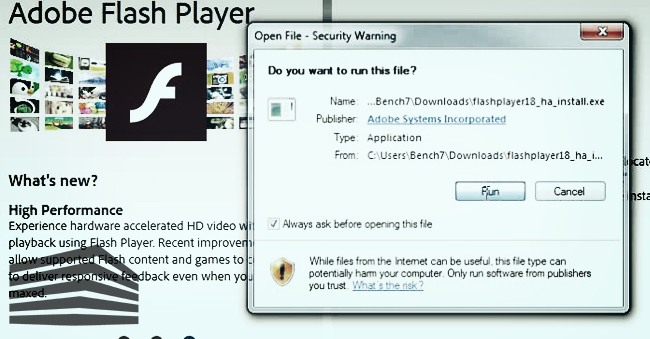
After downloading AFP to your device, you will need to install it. The procedure is much simpler than you think. Just click on the file you downloaded, called installer, and provide the necessary permission to the system.
The process is quick and easy. However, remember that it will offer to install some additional programs, such as the McAfee antivirus and its utilities. These are completely free but, if you don’t need them, uncheck the corresponding box. Install Flash Player in just a few clicks!
Unfortunately, the phrase “I can’t install Adobe Flash Player” is highly searched on Google and search engines. Troubleshooting In these cases, there may be a conflict, especially if the plugin is already installed
. To remedy this, uninstall it and proceed with a clean reinstallation. How to activate the extension
After installation, the plugin will activate itself. To check its correct execution, ensure that these elements are active on your system:
- Internet Explorer — ActiveX
- Microsoft Edge — ActiveX
- Chrome — PAPI
- Opera, Chrome — PPPAPI
- Firefox, Safari — NPAPI
If everything matches what is described, you should not have any problems running the extension. However, if not, you can always check the plugin values through the settings, enabling it if necessary.
Plugin locked? Here’s how to resolve
Is the plugin not working? If you are looking for a guide explaining how to unlock Flash Player, you are in the right place. In recent years, technological advancements have pushed towards lighter and more efficient applications like, let’s say, HTML5.
Nowadays, Google blocks the automatic execution of this plugin, which must be unlocked through the settings. Generally, you should receive a warning about web portals that use Flash. This way, you have the option to allow or block the extension.
However, if this does not happen, you can compensate for this by going into the settings and enabling the dedicated option. Go to Chrome settings and click on Flash. From there, you can decide whether to always receive a prompt before starting content in this language, or to enable it automatically.
In this menu, you can also modify and customize the list of allowed and blocked sites. So, if you do not want to start Flash content on a certain site, from here, you can block it without issues. Similarly, you can also grant permission to all the sites you like.
Update: How do you do it?
Updating Flash Player usually happens automatically. However, if the system does not update and you need the latest version, you can go to the official application page, dedicated to updates, and download the new option.
How to update? The free upgrade to the latest available version is quick and easy to install, and works almost entirely from your device. All you have to do is grant permission to install new plugin updates.
What do you think of this solution for reproducing animations, videos, and games on the web? Are you in favor of switching to HTML 5? Let us know your opinion in the comments!
Tag: install adobe on a smartphone